TL;DR
Designing a high-end custom golf simulator room requires far more than placing a mat in an open space; it demands precise architectural planning tailored to dynamic swing acoustics, ceiling dimensions, and lighting control. While a ceiling height between 9 and 10 feet is ideal, spaces with higher ceilings—such as 16-foot volume rooms—require custom bulkheads and framing because launch monitors perform best mounted roughly ten feet off the ground. For lower ceilings, solutions range from lowering floors to raising overhead structures or building standalone simulator structures. Converting existing spaces like home theaters involves swapping out standard entertainment projectors for dedicated short-throw impact screen projectors and re-evaluating power layouts. Premium design-build standards dictate wall-to-wall putting turf with seamless recessed hitting mats to create a sleek, flush aesthetic. Finally, lighting design requires a precise balance: controlling ambient light to maintain projector contrast while implementing dimmable LED accent framing. For performance-focused players utilizing high-speed video swing analysis (120 to 1,000 FPS), custom lighting circuits must provide intense, targeted illumination to ensure pristine frame capture without compromising image quality.
Optimizing Ceiling Heights and Framing for Launch Monitor Accuracy
Tyler: And realistically, ideally, we need them closer to 9, 10, 11 feet for these. Short throw projector. Even in those scenarios where, okay, yes, there is already at least a ceiling outlet up there, we need to still ideally move that. We’re not running some channel up on the ceiling. We can we can get it back to where it can be for the launch monitor and the projector itself. That’s more maybe more of a scenario where the clients feel like they’ve got all the pieces. We don’t have to do a lot of the electrical, but then when we go and look at it, we can point out some of those additional considerations.
Cliff: Yeah.
And then I would add, most simulator rooms, especially if it’s a retrofit, we’re having to, run wires in an already finished room. We got to cut some holes in the in the walls and the ceilings to run those wires. We come back and patch and paint that to make it look like nothing ever happened. So there’s a lot of, drywall, whether it’s a new room we’re building or a retrofit, we’re doing a lot of drywall work, a lot of paint work.
Converting Existing Home Theaters and Managing Power Demands
Stephen: A lot of times we’re doing really nice Wood trim features on the walls and the ceilings, or there’s staining and painting, all that stuff. We obviously covered a certain aspect of this with the electrical, but I’ll I’ll ask the whole question and obviously we’ll we’ll probably just focus more on the lighting aspects of things, but what electrical and lighting requirements should be planned before installation?
Tyler: Yeah, I’ll I’ll jump about this one so I started. And to your point, Steve, maybe we’ll talk a little bit maybe. More focused on the lighting considerations. One of the things that’s, probably the biggest things we have to work around from a simulator space is just controlling the overall a mixture of the ambient light and then any added light that we added to this space. We just with the nature of projectors, whether it’s in a golf simulator or a movie theater setup, the more ambient light you have, the more it’s going to impact your black levels and the overall contrast. Ratio on the screen and your overall picture quality. One thing we want to we try to do is you come up with ways to control any ambient light that’s outside of the space that might be coming in.
Tyler: Sometimes that’s including curtains or putting up additional walls.
And then in terms of the actual lighting in the room, you do want lights to be able to turn on when people are coming in, and ideally they’re dimmable. You can bring it down to a level you’re controlling the lights. Sometimes another consideration especially for the more performance focused golfers that want to do more like swing camera analysis and high speed video capture we will put in additional lights specifically for the swing camera capture because with the nature of those high speed cameras they and go anywhere from 120 fps up to a thousand fps and in order for them to be able to capture a good image especially in color you have to have to have a lot of light on the golfer Specifically just to enable that.
Tyler: Just going back through, biggest things are controlling ambient light, having manageable light, dimmable light inside the simulator space that you can control to improve the overall image quality on the screen, the contrast reach, the contrast levels. But again, additional considerations if you’re more performance focused and want to do swing capture analysis and have high quality slow motion video, you need a the ability to turn up a lot of light in those situations and have that accounted for.
But, Cliff, you can cover anything else.
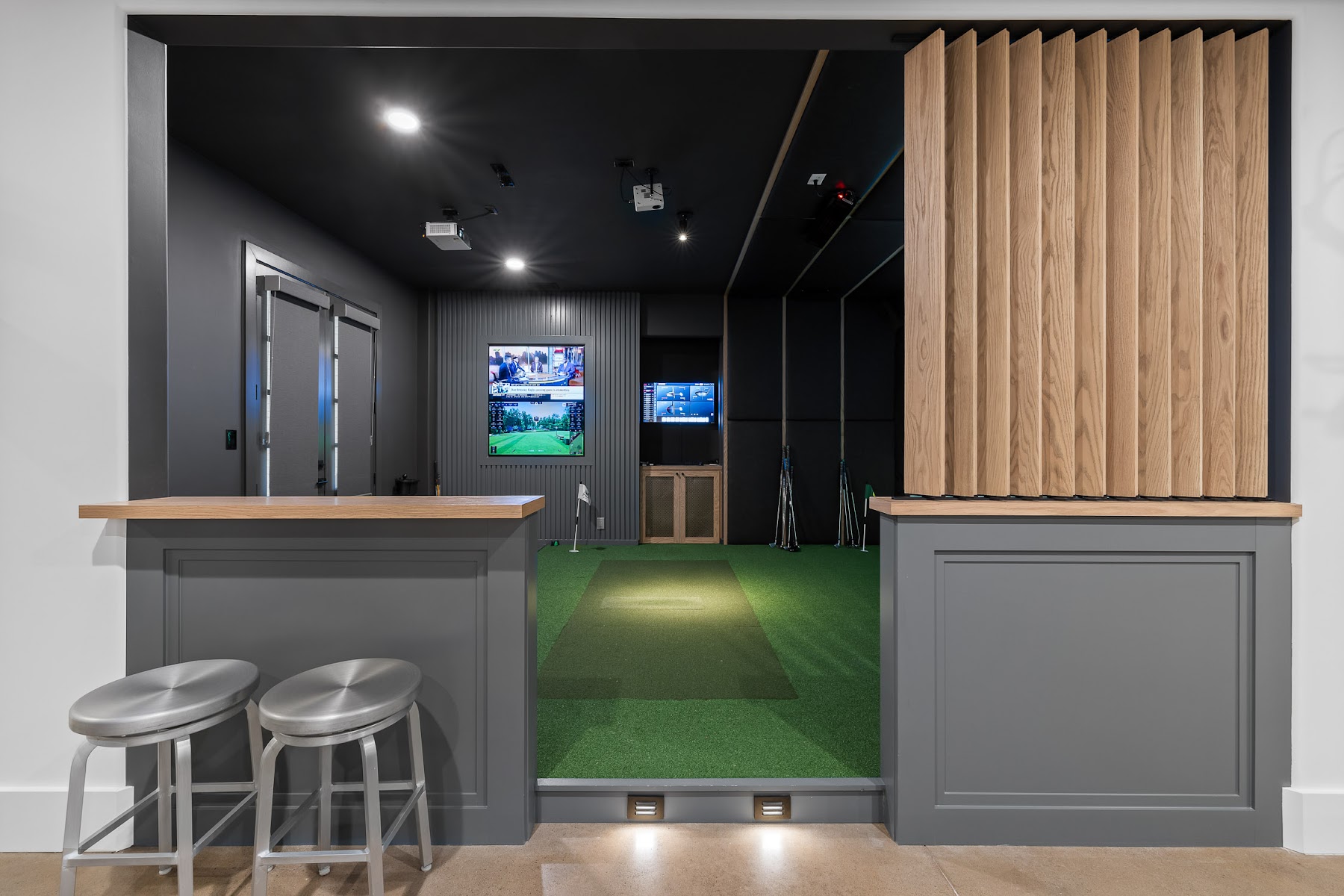
Cliff: Yeah. My personal preference is a dark moody room, right? I when I’m playing golf, I like the projector screen to glow. I’ve got my LED lights up and around our padding and we do that on probably 70 or 80% of our simulators is just a nice dimmable LED frame the room. And then I have a pin light and we do that in a lot of customer rooms where it just shines down on the ball. My preference is like a pin light on my ball My LED lights around my screen and then the projector glow and it’s nice and dark and awesome.
Ambient Lighting Control and High-Speed Camera Illumination
Cliff: Everybody has a preference. I will I love that just like dark, just the LEDs shining. And then one last thing, you don’t think about it, but you’re in a confined space hitting balls one after another, and it gets hot. I also like to plan for a fan. Like I’ve got a little wall-mounted, nice fan that oscillates and keeps some air flowing in the room. Because it gets warm when you’re hitting balls one after another. Planning for some fans and air movement’s also another key thing that I think a lot of people miss out on.
Comparison at a glance
| Factor | Short throw (simulator) | Long throw (movie room) |
|---|---|---|
| Distance from screen | 9 to 11 feet | 17 to 18 feet back in the room |
| Intended surface | Simulation impact screen | Movie theater screen |
| Existing ceiling outlet | Typically must be relocated during conversion | Already positioned for theater use |
| Risk if not moved | Surface channel run across ceiling; poor placement | Not applicable |
Frequently Asked Questions
What ceiling height is required for a home golf simulator installation?
The ideal ceiling height for a custom golf simulator installation is typically between 9 and 10 feet to allow full, uninhibited swings for players of all heights and swing steepnesses. If ceilings exceed 10 feet—such as in 16-foot high spaces—custom bulkheads must be framed in because overhead tracking equipment operates best around 10 feet off the floor. For rooms below 9 feet, structural modifications like lowering the floor, vaulting the ceiling, or utilizing an exterior space may be necessary.
Can I convert an existing home theater into a luxury golf simulator room?
Yes, home theaters can be successfully converted into custom golf simulator lounges, but key infrastructure changes are required. Theater room projectors and power drops generally do not align with golf simulation needs, which rely on specialized short-throw projectors mounted to avoid casting hitter shadows on the impact screen. Electrical layouts must also be adjusted to accommodate tracking hardware, high-powered PCs, and specialized room lighting.
How should flooring and hitting mats be integrated into a custom golf simulator room?
A professional custom golf simulator build typically features wall-to-wall putting turf with a seamlessly recessed hitting mat. Recessing the hitting mat ensures it sits flush with the surrounding turf, eliminating awkward edges and trip hazards while creating a polished, built-in aesthetic. This configuration allows golfers to walk comfortably across the entire space and transition smoothly from full-swing tracking to short-game putting.
How does ambient lighting affect golf simulator image quality?
Ambient light strongly impacts projector black levels, color accuracy, and overall image contrast on the impact screen. To achieve optimal visual clarity, simulator rooms should feature dimmable, directional lighting—such as low-profile LED strips framing the room perimeter—to maintain a dramatic display while keeping light off the screen face. Controlling external natural light with blackout shades is equally critical for image crispness.
What lighting is needed for high-speed camera swing analysis?
Performance-focused golf simulators using high-speed cameras (ranging from 120 up to 1,000 frames per second) require dedicated high-intensity lighting pointed directly at the golfer. High-speed video sensors need massive amounts of light to capture clear, color-accurate swing frames without motion blur. These specialized video analysis lights should be installed on independent dimmable circuits so they can be turned on during coaching sessions and dimmed during causal gameplay.